Problem
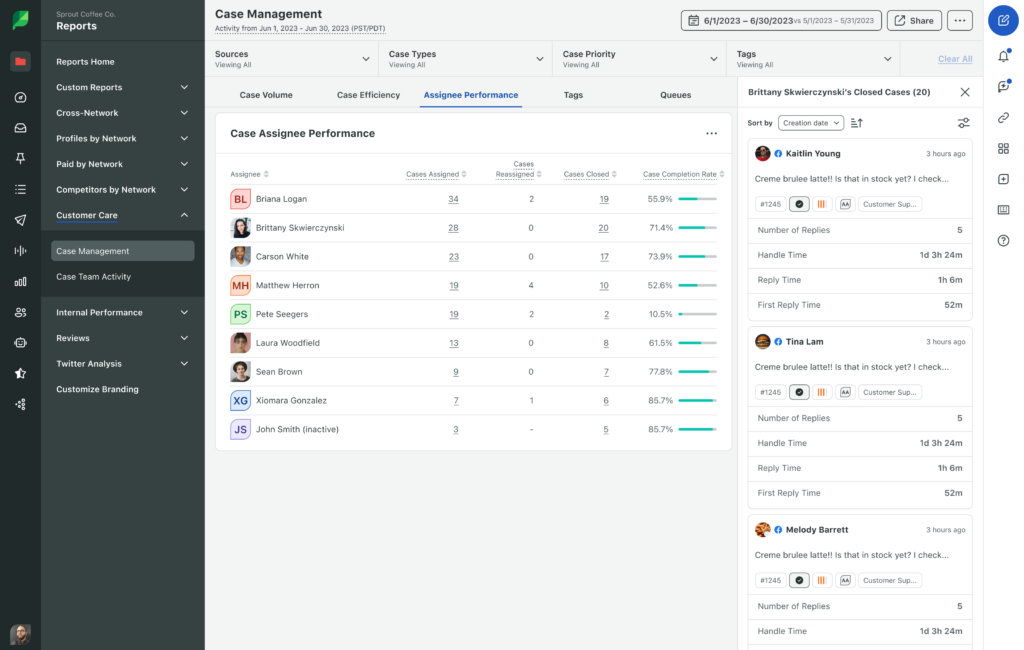
Previously, the Case Management Report provided high-level aggregate metrics (e.g., “10 Closed Cases”) that are static. Users cannot drill down into these numbers to understand the context or case makeup. To identify specific cases, managers must manually navigate to the case queue and attempt to recreate the report’s filters, leading to tedious analysis and a lack of trust in the data.
Impact
By completing this project, we were able to help advance over 7 enterprise customer prospects representing nearly 50K MRR in deal size. For existing customers, it means they no longer have to dig around other areas of the app to find the cases behind a number in their reports. The project also set a pattern for the product: bringing data to customers where they already are.
“I checked the ‘Case Assignee Performance’ report… it only shows closed cases. However, I need to see the replies and cases worked on… This would be really helpful for us when auditing agents’ cases” – Customer Quote
The users
C
Customer care agents
Responds to social media inquiries on behalf of a brand.
M
Managers
Leads a team of agents, makes sure team is performing efficiently
The solution
Clickable metrics: The report’s counts (Cases Assigned, Cases Closed, Cases Reassigned and Cases Handled) became clickable. Clicking one opens a side drawer listing the cases behind that number.
Familiar pattern: The drawer follows the drill-down pattern from Reviews, so managers already know how it works.
Context carries over: The drill-down keeps the report’s active filters (date range, team, channel, tag), so the list always matches the number you clicked.
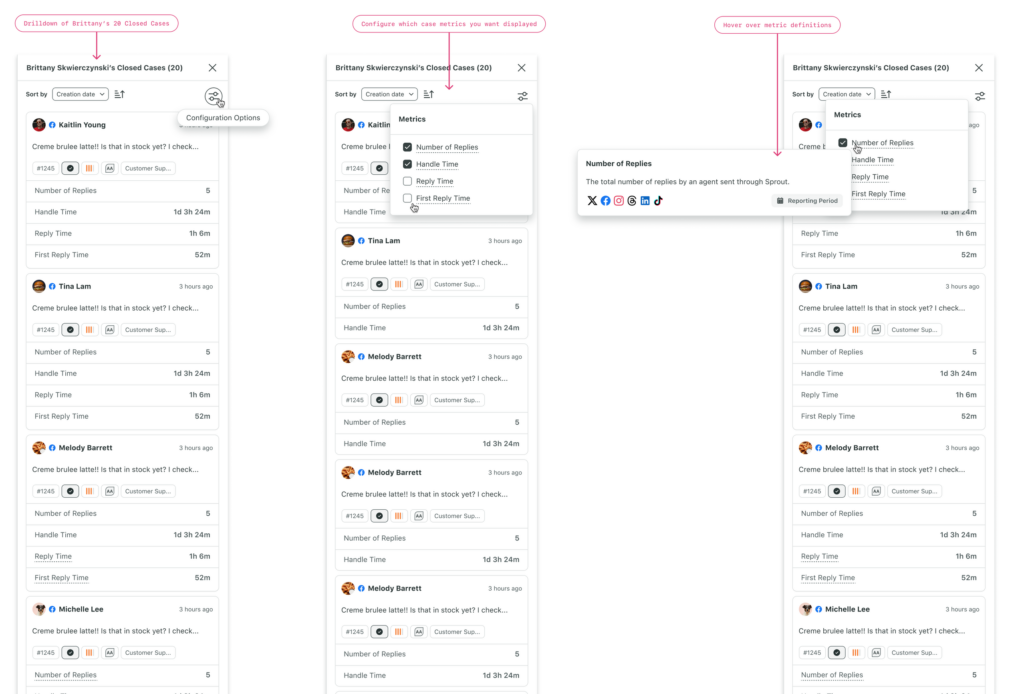
Sorting that sticks: Managers can sort by creation date, number of replies, handle time and first reply time, and the choice is persisted between sessions. This makes it easy to find stalled or high-activity cases, based on business preferences.
Clear definitions: Each metric has a tooltip that defines the number in user friendly language.
Research, not processing: I scoped the drill-down as a read-only tool. Export, bulk actions, and editing were left out of this release, and clicking a case opens the full case view for any changes.
Takeaways
- This was an example of a project that both directly drove Sprout’s revenue goals by unblocking our Sales team, while also being opportunistic in solving a very real UX problem that had long been ignored. Reporting had started to take the place of live dashboards, but the nature of reports are static and usually generated for export. Having a drilldown view is a step in the right direction of bringing data to where are users already are. Should this be a dashboard? Probably, yes, but within business timeframes, we maintained existing patterns while delivering significant UX value.
- In its initial state, these drilldowns present all the data with some filtering and sorting capabilities. However, as this feature evolves, AI can play a huge role in surfacing insights within this goldmine of data. It can easily surface abnormal cases without the Care Manager having to dig, and explain why these cases are deemed so.